Thursday, June 14, 2007

68. Earn Money Online With John Chow Dot Com

At last, I've decided to write a review about John Chow Dot Com. I can't remember how exactly I found out John Chow Dot Com but if I'm not mistaken, maybe I knew this site when I'm started blogging around April 2007. As an introduction, John Chow Dot Com is a blog discussing about cars, fine dining, technology, the net and the most wanted topic which is make money online.

I never meet John Chow face to face but I think John Chow is a kind person according to his friendly post and this quote which I found in John Chow Dot Com.

John Chow, a damn fine person, friend of the community, Ultimate Fighting Championship contestant, member of the Save the Whales Foundation, the man who controls the black market on baby seal pelts and member of the “probably yo’ daddy” foundation.

Right now, he is offering a free linkback to those who review his blog. For me as a newcomer in blogsphere, this is totally a great deal if I get a valuable link from his PR6 blog. By the way, John Chow dot com has more than 5000 RSS readers which shows that he has his own follower and his posts is read by many people.

For your information, John Chow also go by the nick name "Moto", named after the old video game Moto Racer. He lives in Vancouver, Canada and before discovering the internet, he was a partner in a local Richmond printing company. John Chow has been in the internet since 1999 with his technology site and he claim himself as a master of The Techzone and TTZ Media Network.

I like to read John Chow's posts about AGLOCO and right now he has more than 20000 referrals sign up in his network so far. In fact, I learned something everytime I visit his blog. Some of my favorite posts includes:

1. Making Money With Domain Names

2. The Art of Link Baiting

3. Pumping Out The Content

4. How Often Should You Update

5. The 7 Habits of Successfull Bloggers

Saturday, June 9, 2007

67. Viewbar FAQ Page (Part 2)

This is the second part on the Viewbar Frequently Asked Question (FAQ). More update about AGLOCO on this blog, subscribe via email to get the post in your mailbox.

What is my Member ID?
You can always use the email address you became a Member with to get access to your account or your Viewbar. You can also go to the AGLOCO website sign in page and click on “forgot your info”.

What is my password?
Go the AGLOCO website sign in page and click on lost “forgot your info”.

What are the features of the Viewbar? How does it work?
We’ll address the Viewbar’s features from left-to right:

Options: Right-Clicking on the “AGLOCO” logo on the left-hand side of the Viewbar brings up several options. In addition to access to the AGLOCO website and your Account page,

  • Dock: You can choose to dock the Viewbar at the top or the bottom of the screen
  • Skin: The Viewbar is currently available in four colors: Blue (default), Green, Red, and Purple
  • Language: The Viewbar is currently available in both English and Chinese
  • Advanced Options: These include a place to put your proxy settings (if you access the internet through a proxy) and your auto-update settings.
Accrual Indicator: The second letter “o” in the AGLOCO logo tells you whether you are currently accumulating AGLOCO Hours. If it is green, you are. If the indicator is red, you are not currently accumulating hours (most likely because either you are not actively browsing the internet or because you have already reached your monthly maximum).

Ad space: The largest space on the Viewbar is for a text ad. If you see something interesting, click on the ad to check it out! The ad will open a new tab or browser window, so your current browser should not be interrupted.

Search: Conduct your internet searches using the toolbar. We have several search engines available, including Google, Yahoo, or Amazon.
- To select your search engine: Click the logo on the left-hand side of the search field and a drop down menu of all available engines will appear
- To search: Type your query in the search field and either hit “enter” on your keyboard or click the magnifying glass button.

Favorites and Tools: The “gear” button has tools for AGLOCO Members. Currently, the tools are simple, but this section of the Viewbar will be expanded over time.- Favorites: The Viewbar has all your favorite websites from Internet Explorer and Firefox, as well as a few AGLOCO-selected websites- Tools: Right now this enables you access to the Windows calculator and Windows calendar. This capability will be expanded with more tools in future Viewbar versions

Minimize: The down arrow on the right side of the Viewbar minimizes the Viewbar software. When minimized, the Viewbar will be off your screen and will not be monitoring your internet surfing. You will not accumulate hours for the time the Viewbar is minimized.

Ads aren’t showing up properly on my Viewbar. What do I do?
Try waiting a few minutes, as we may be conducting routine maintenance on the ad server or experiencing another temporary issue. If that doesn’t work, try restarting the Viewbar. To restart the Viewbar, right click on the Viewbar icon (a green “o”) in the Windows icon trey on the lower-right hand corner of your screen, and select “quit”. Then, right click again on the Viewbar logo and select “sign in”.

How do I log in as another Member from the same computer?
There should be an AGLOCO icon in the icon trey on the lower-right hand corner of your screen (a Green ‘o’ ). Right-click this icon and select “sign out”. Then, right click on the icon again and click “sign-in”. The sign-in screen will pop up and you can sign in as a new Member.

How do I get credit for using the Viewbar?
Simply surf the internet while the Viewbar is visible on the screen. The software calculates the time you spend actively surfing and tallies it. The current maximum is 5 hours/month. You also get credit for your referrals’ surfing.

How do I minimize the Viewbar and get it off my desktop?
Click the down arrow on the right side of the Viewbar. When minimized, the Viewbar will be off your screen and will not be monitoring your internet surfing. You will not accumulate hours for the time the Viewbar is minimized.

It's Your Internet - Own A Piece of It

4 Simple Steps To Earn Money Online
1. Sign Up as an AGLOCO Member (It's FREE).
2. Join 'My AGLOCO Team'.
3. Download the Viewbar.
4. Continue surfing AND get paid.

Wednesday, June 6, 2007

66. Viewbar FAQ Page (Part 1)

What is AGLOCO? Get the information about this Internet Revolution HERE!


In 3rd of June, AGLOCO Development Team has announced a quick updates regarding to the Viewbar issue and questions about the software. They have implemented a Frequently Ask Question (FAQ) about the Viewbar and according to the updates, they would like a feedback from us (AGLOCO members) if there are something confusing with the Viewbar. You can reach AGLOCO customer support by dropping an email to this address : help@agloco.com. So, here is the FAQ Page which can be found on the right had-side of the Official AGLOCO Blog.

What is the Viewbar?
The Viewbar is downloadable toolbar software that enables AGLOCO to collect money on your behalf as you actively browse the Internet.

How do I download the Viewbar?
First, sign in to your account. On your account page, there will be a button that says “Download Viewbar”. Click that button and follow the instructions on screen to download the Viewbar (when prompted, click “run” instead of “save”).

I am having a problem installing and using the Viewbar. What do I do?

Here are some common errors:

  • Viewbar is compatible with Windows – Windows 2000, XP and Vista. Mac and Linux versions are not available yet.
  • You should hit “run” instead of “save” during the installation process.
  • You may have a firewall block you (With firewalls the Viewbar needs an OK for its viewbar.exe program and its update.exe program – otherwise it will not function).
  • You need to put in your correct Member ID and password (if you can not remember yours, go to the AGLOCO website sign in page and request a new password)
  • No green light in the Viewbar logo. Make sure you are connected to the Internet and are actively using a browser (IE or Firefox). Give it 2 minutes to connect to the database.
  • If you have any other problem get a new Viewbar, you can always try restarting the Viewbar. If that still doesn’t work, you can also try reinstalling the software.
  • To restart the Viewbar, right click on the Viewbar icon (a green “o”) in the Windows icon trey on the lower-right hand corner of your screen, and select “quit”. Then, right click again on the Viewbar logo and select “sign in”.
  • To reinstall the Viewbar, first right click on the Viewbar icon (a green “o”) in the Windows icon trey on the lower-right hand corner of your screen, and select “quit”. Next – click on the Windows start button, then navigate through all programs and AGLOCO Viewbar – then select the Viewbar uninstall program. Then, download the Viewbar again by sigining into your AGLOCO account on the website and clicking “download viewbar” on your account page. This will give you a new Viewbar.
It's Your Internet - Own A Piece of It

4 Simple Steps To Earn Money Online
1. Sign Up as an AGLOCO Member (It's FREE).
2. Join 'My AGLOCO Team'.
3. Download the Viewbar.
4. Continue surfing AND get paid.

Monday, June 4, 2007

65. Develop Your Career With CareerRamblings.com

The combination of John Anthony and Jane May to write about their experiences in Corporate America and life in general have establish the great sites; CareerRambligs.com.

John Anthony have an experienced in the investment management business in Southern California. He writes about his journey while building his career. Jane May works as a consultant to many companies and she has working relationships with 23 companies and over 200 business students and also new professionals.

With a Pagerank of 6 from Google, CareerRambligs.com truely have a high quality contents. John Anthony and Jane May wrote many informative and attractive posts for those who interested in career development and entrepreneur advice. Right now, if you do a review of their site, they will return a favor by linking back to your review and send their readers to your site/blog.

As for me, CareerRamblings.com is the place which you can get some sound career development advice and hot tips about your job. This site also covered topics ranging from tips to be succesful in your job, freelancing writing tips, resume and a lot of career growth tips.

I do appreciate both of them; John Anthony and Jane May for offering a free linkback for reviewing their site. If you need some career advice, there are no other place better than CareerRamblings.com.

64. Just Got My Viewbar!

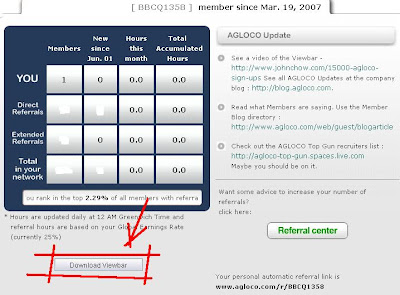
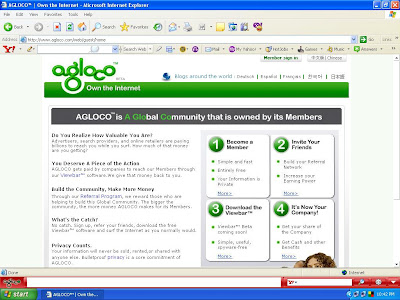
After reading two post from my fellow AGLOCO bloggers about the Viewbar(ThatFreak and Turk), I decided to check out my AGLOCO account page for myself. I think I don't want to make this post long, so hopefully these screenshots tells all and you should download your Viewbar right now.

Screenshot 1 : First step, download the Viewbar.


Screenshot 2 : 1% more to complete the download process.
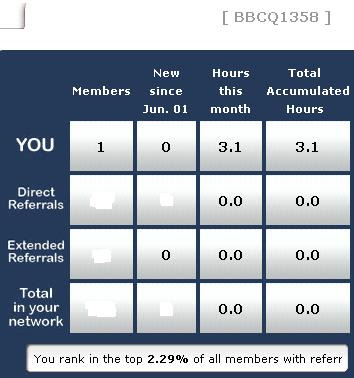


Screenshot 3 : I'm using the Viewbar


Screenshot 4 : Start earning with the Viewbar.

As you can see, I'm start earning my total accumulated hours with my Viewbar. Not an AGLOCO members yet? Why don't you sign up with me and we can build the network together. Don't worry, it's totally FREE and there's no need to buy or sell something after being a member. Simply click the 'JOIN NOW' button and start your journey to make money while surfing the internet.


It's Your Internet - Own A Piece of It

4 Simple Steps To Earn Money Online
1. Sign Up as an AGLOCO Member (It's FREE).
2. Join 'My AGLOCO Team'.
3. Download the Viewbar.
4. Continue surfing AND get paid.

63. Capture Colors Using AdesClrPicker

Just now, I'm stucked at AdesBlog.com. The author of this personal blog is giving away free linkback for reviewing his own product, AdesClrPicker. I think this is a great chance and I'm on my way to write about the AdesClrPicker.


Before that I would like to tell you a little bit about the author. Abdylas Tynyshov (picture) who is better known as "Ades" is a full time blogger, Internet Entrepreneur and Creative Consultant from Kyrgyz Republic. Ades is a founder of Adesdesign.net which is a web portal that offers high quality web resources, web design related tutorials and software like AdesClrPicker.

Actually, AdesClrPicker is a software to capture colors to your websites or blogs. If you still using Photoshop, Ithink you should try AdesClrPicker because with this software you can do the same much faster. You can get this nice color picker trial version if you wish to try it by yourself.


Screenshot : AdesClrPicker in the System Tray.


Here are some of the advantages and features for AdesClrPicker according to Ades.

1. Improved interface.

2. You can modified the colors in Color Library.

3. Automatically add colors from Floating Menu to the Color Library.

4. You can use Color Library to store your favorite colors.

5. To exit the program, just Right Click the mouse.

6. Tooltips for the beginner users (which can be ON/OFF)

7. Easy to use and user friendly.

8. Loads fast and small in size.

9. Use hotkey to capture colors.

10. Can store last 10 captured colors in the memory.

Besides this great softwares, Ades also comes up with an excellent and informative blog post about Web 2.0, Online Tools, Search Engines Optimization (SEO), latest Web Technologies and making money online. For more information, you can visit AdesBlog.com now.

Sunday, June 3, 2007

62. The Viewbar Released!

It's been two weeks I didn't write about AGLOCO (What is AGLOCO?) since my last post about an exclusive 'Link Train' for all AGLOCO Members. The Official AGLOCO Blog has finally been updated. In the updated, Brian mainly talked briefly about releasing the Viewbar (What is the Viewbar?). He said that AGLOCO's Team has finally solved the ad server problem and the Viewbar will be launch this Monday (Tuesday in Asia).


We have made a workaround regarding the ad server problem and we will finally be launching the Viewbar. Some, but not all, of our ad networks will be connected. These networks have enough ads on them, so we are comfortable releasing the software as we continue to work on the outstanding issues that remain with the other networks. All of the preliminary Viewbar functions are there, but with the ad problems we will not be initially launching with the personalized ad
targeting. We will continue to develop this capability after we have launched and when it is available the new version of the software will be incorporated into your viewbar automatically.

Brian also mentioned about the Viewbar that will be launch is the first version (V1.0) and it will be an automatically self updating software. This is the whole post by Brian Greenwald (AGLOCO Development Team) in the Official AGLOCO Blog.

Remember that this is the first version of the Viewbar (v1.0), and with the Viewbar being automatically self-updating software, gradual improvement (both aesthetically and functionally) will appear seamlessly (you also have an option to turn off this feature and ask for updates manually, though we recommend leaving the auto-updating feature active so that you always have the latest software as improvements are made).

This weekend the Viewbar download is being moved from the test servers to the main servers. We will NOT need to temporarily take down the web site as we had thought, so we will not be sending out an email warning on that. If the transfer goes smoothly, the first download
emails will be going out Monday morning California time (early Tuesday in Asia).

Please remember:

If you have a Norton firewall you may be asked to allow access to “viewbar.exe” and “update.exe” (please check “Permit Access Always” for proper installation of the Viewbar).

The Viewbar is currently available for Windows 2000, Windows XP, and Windows Vista and will work with IE (Internet Explorer) or Firefox browsers.

I’m sure you are all just as ready for the Viewbar release as we are!

Brian Greenwald
AGLOCO Development Team


Related Post


It's Your Internet - Own A Piece of It

4 Simple Steps To Earn Money Online
1. Sign Up as an AGLOCO Member (It's FREE).
2. Join 'My AGLOCO Team'.
3. Download the Viewbar.
4. Continue surfing AND get paid.

61. Viralink Opportunity

While reviewing Ja Kel Daily Dot Com, I found out one post about a viral linking strategy to increase Technorati's ranking. This idea was initiated by Andy Coates and to participate it, just copy the Viralink section and follow the instruction below. Start getting your backlinks now!

—copy and paste the Viralink and instructions below this line—

Below is a matrix of 120 stars, I have already added a link to my blog onto one of the stars, all you need to do is copy and paste the grid into your blog and add your own link to one of the other spare stars, and tell others to do the same!

Viralink
* * * * * * * * * * * * * * * * * * * *
* * * * * * * * * * * * * * * * * * * *
* * * * * * * * * * * * * * * * * * * *
* * * * * * * * * * * * * * * * * * * *
* * * * * * * * * * * * * * * * * * * *
* * * * * * * * * * * * * * * * * * * *


New Addition: When I receive a ping back once you have added the Viralink to your site I will add your link to this grid, and each person who copies the grid from here will also link to your site!

—copy and paste the Viralink and instructions above this line—


If you want to know more about how this strategy works and the deatils about this Viralink, check out this post.

60. Review On Ja Kel Daily Dot Com

Hello friends and all readers, this is actually my first review for a PR5 sites, Ja Kel Daily Dot Com. To be honest, I'm not too good in doing a site's review. I have to admit this but I will try my best to improve my writing skill from time to time. Okay, I will write a review which covers certain aspect; the author/authors info, type of sites/blogs and graphical user interface (GUI).

The author of Ja Kel Daily Dot Com, Jason loves to blog and is offering to link to your blog if you review his blog. So, I do get a linkback as exchange for this review. Hopefully a linkback from this PR5 site will boost up my blog's rank in Technorati and Alexa Dot Com.

A little bit about the author, Jason was married and a loving father to a daughter (Layla) and a son (Tate). What I got from my first impression is Jason likes Ferrari and he blogging about investing, make money online, cars, his personal life, wordpress plugin, the net and technology.

In terms of graphical user interface, Ja Kel Daily Dot Com using 2 columns with neatly arranged menu and plugin. This site is rather user friendly and it's easy for me to browse from one post to another looking for my interest, make money online and FREE stuff.

I recommend you to be a regular visitor to Ja Kel Daily Dot Com because it's worth to read Jason's posts. If you don't have time, consider to subscribe to the RSS feed and you will get the latest post via email. Last but not least, I love the quote of Jason's site : "No Limitations Just You And Your Keyboard".

Friday, June 1, 2007

59. E-mails From Nuffnang

What is AGLOCO? Get the information about this Internet Revolution HERE!

Yesterday, I got another 2 emails from Nuffnang (What is Nuffnang?) mentioning about incoming advertisements on my blog, Project AGLOCO. The advertiser, Sportsplanet have choose to advertise in my blog from 3rd of June until 30th of June 2007. Wow, it's about a month and I hope these campaigns will increase my earnings in the Nuffnang's account.


Image 1: Screenshot for my first email from Nuffnang

Image 2: Screenshot for my second email

In addition, I have checked out new information from Nuffnang Official Blog and found out that starting on 3rd of June 2007, every blog in the Nuffnang Community will be served a paid ad. This is what Nuffnang's admin said in the latest post:

New Advertiser Campaigns - Starting from this Sunday just about every blog in the Nuffnang Community will be served a paid ad. We will also be rolling out our first Cost Per Click campaigns where bloggers will be paid anywhere from RM0.50-RM5 per click, depending on the advertiser. Also expect to see a number of Cost Per Action schemes on our network in time to come. As with the rest of the campaigns we run, our advertisers pay only for unique visitors originating from Malaysian IP addresses and clicks but the Cost Per Action scheme will be independent of the country’s unique visitors.

New Events - We’ve received a number of complaints from bloggers in North Malaysia that we haven’t yet had a Nuffnang event there. Along with a panel of Nuffnangers, we’re already finalizing the works of a blogger event to be held up in Penang by the end of June. To the Nuffnangers in East Malaysia, don’t pack your bags… we’ll be there before you know it.
Related Post


It's Your Internet - Own A Piece of It

4 Simple Steps To Earn Money Online
1. Sign Up as an AGLOCO Member (It's FREE).
2. Join 'My AGLOCO Team'.
3. Download the Viewbar.
4. Continue surfing AND get paid.